Satellite 2012 Theme
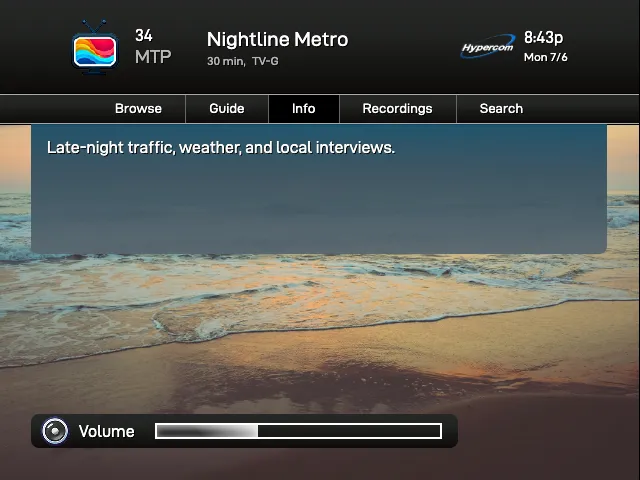
Satellite 2012 is based on early-2010s satellite receiver graphics. Similar to our sat2007 theme, this theme shows channel icons alongside program information like title, time, rating, and optional decorative status icons and menu options. Pressing the info control expands the OSD with program summary and background audio details when available.
osd: theme: sat2012Colors
Section titled “Colors”Satellite 2012 uses primaryColor for the top banner, menu borders, and receiver shell. If you do not set it, TVS uses black.
accentColor is used for the selected menu item, expanded info panel, and receiver volume bar. If you do not set it, TVS uses a blue-green accent for the info panel and menu selection.
osd: theme: sat2012 primaryColor: "#111111" accentColor: "#0c496d"Theme Options
Section titled “Theme Options”extraMenuItemsBefore
Section titled “extraMenuItemsBefore”Type: array of strings
Adds menu labels before the built-in Info item.
extraMenuItemsAfter
Section titled “extraMenuItemsAfter”Type: array of strings
Adds menu labels after the built-in Info item.
unknownChannelIcon
Section titled “unknownChannelIcon”Type: image path or URL
Image to use when the active channel does not define its own icon. If this is not set, TVS uses the built-in unknown channel icon.
providerLogo
Section titled “providerLogo”Type: image path, URL, or false
Provider logo shown in the right side of the tuner banner. If omitted, TVS uses the built-in provider logo. Set this to false to hide the logo entirely.
Example: Provider Logo and Custom Menu
Section titled “Example: Provider Logo and Custom Menu”osd: theme: sat2012 primaryColor: "#111111" accentColor: "#1782b6" themeOptions: providerLogo: /placeholders/tv.png unknownChannelIcon: /placeholders/no-signal.png extraMenuItemsBefore: - Guide - List extraMenuItemsAfter: - Audio - MoreTo remove the provider logo while keeping the rest of the theme, set providerLogo to false.
osd: theme: sat2012 themeOptions: providerLogo: false