Program Guide
The program guide engine displays a non-interactive program guide for channels in your configuration file. It will scroll automatically through a configurable range of channels and display program information for each one.
Themes
Section titled “Themes”The guide engine supports multiple themes, each of which acts similar but may have slightly different features and are modeled after real guides of the time. They can be customized with different colors and other options.
Default
Section titled “Default”Modeled after the Prevue Guide.
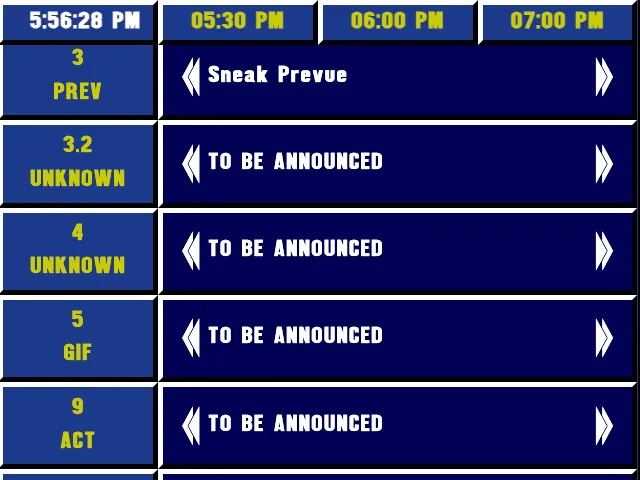
Modeled after the EPG Jr..
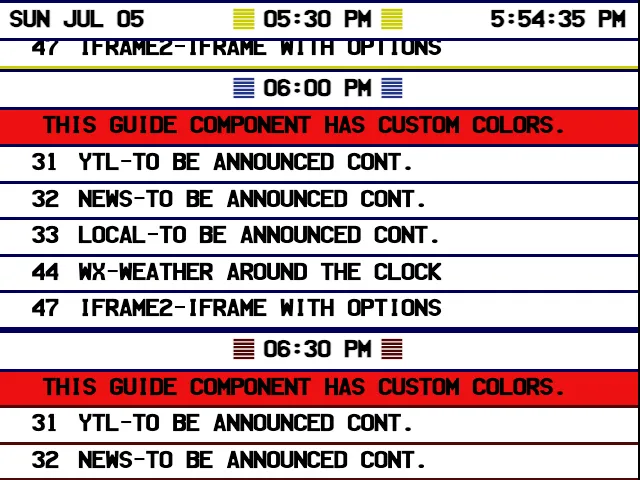
Modeled after PC Prevue.
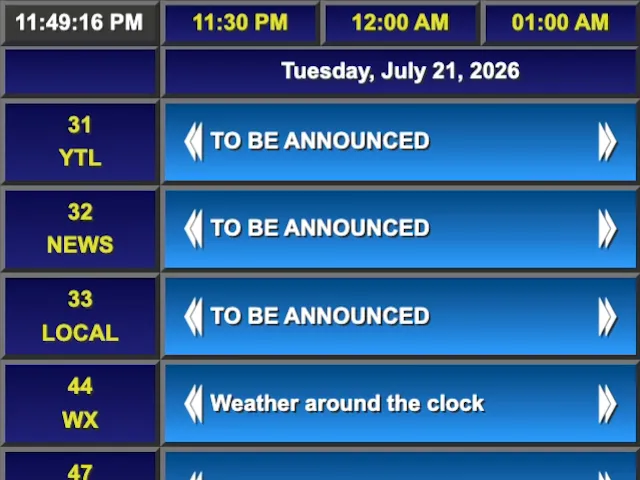
Modeled after Hollywood.
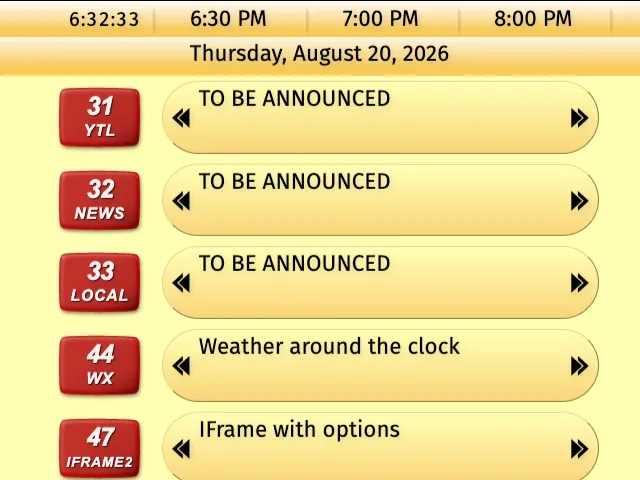
Splitting the Screen
Section titled “Splitting the Screen”Technically the program guide engine is just the guide itself, but it can be combined with other engines to create split-screen experience you remember from TV. The v-split and h-split layouts are perfect for this and were created originally to achieve this effect.
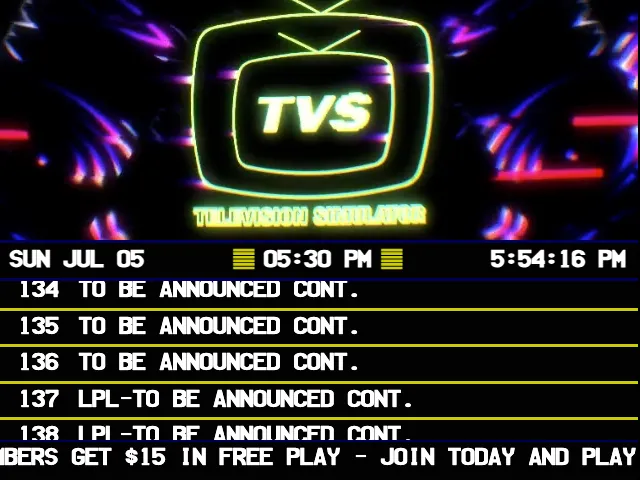
- number: 165 name: Program Guide 1989 Split abbr: GUIDE info: title: Prevue Guide v-split: - video: src: /placeholders/tvs-loop.mp4 aspectRatioBehavior: cover - guide: theme: "1989" themeOptions: ticker: # Optional messages to scroll across the bottom of the screen - "Hypercom cable - connecting you to the future" - "Pay-Per-View Movies - Ch 1 - Straight from Hollywood to your home, anytime!" - "Sponsored by Oak Ridge - Visit our new factory outlet store" - "Sponsored by Greenhill Plaza Grand Hotel - New casino members get $15 in free play - Join today and play for free!"Properties
Section titled “Properties”timeslots
Section titled “timeslots”Type: ITimeslotOptions
Description: Controls how many time columns are visible in the guide and how much time each column represents.
number sub-property required
Section titled “number ”Type: number
Description: Number of timeslots to show in the guide at once.
minutes sub-property required
Section titled “minutes ”Type: number
Description: Number of minutes represented by each timeslot.
guide: timeslots: number: 4 minutes: 30guide: timeslots: number: 6 minutes: 15timezone
Section titled “timezone”Type: string
Default: The system’s local timezone
Since: TVS 6.1.0
Description: IANA timezone used to format the guide’s full date, current-time clock, and timeslot labels, such as America/New_York, Europe/London, or Asia/Tokyo. This changes how dates and times are displayed; it does not change which program is playing now.
currentTimeFormat
Section titled “currentTimeFormat”Type: string
Default: h:mm:ss a (h:mm:ss for the 1999 theme)
Since: TVS 6.1.0
Description: Format used by the current-time clock, which updates once per second. It accepts the same date and time format strings as the character generator, including h:mm:ss a for a 12-hour clock and HH:mm:ss for a 24-hour clock. The 1999 theme defaults to h:mm:ss, which omits the AM/PM indicator.
currentTimeslotTimeFormat
Section titled “currentTimeslotTimeFormat”Type: string
Default: hh:mm a
Since: TVS 6.1.0
Description: Format used for timeslot labels, such as 10:00 AM, 10:30 AM, and 11:00 AM.
currentDateFormat
Section titled “currentDateFormat”Type: string
Default: Theme-specific
Since: TVS 6.1.0
Description: Format used for the guide’s full-date display. When omitted, each theme keeps its original format: the default, 1997, and 1999 themes show a long date such as Tuesday, July 21, 2026, while the 1989 theme shows an abbreviated date such as Tue Jul 21.
guide: timezone: "America/New_York" currentTimeFormat: "h:mm:ss a z" currentTimeslotTimeFormat: "h:mm a z" currentDateFormat: "EEEE, MMMM d, yyyy"For a 24-hour guide clock and timeslots, use HH:mm:ss and HH:mm:
guide: currentTimeFormat: "HH:mm:ss" currentTimeslotTimeFormat: "HH:mm"For more examples of how to format dates and times, see the Formatting Dates & Times reference page.
Type: default | 1989 | 1997 | 1999
Description: Theme preset used to render the guide.
alerts
Section titled “alerts”Type: IAlert[]
Description: Alert messages to display at specific channel positions.
position sub-property required
Section titled “position ”Type: ConfigChannelNumber (string | number)
Description: Channel number where this alert should be shown.
text sub-property required
Section titled “text ”Type: string
Description: Alert text to display.
guide: alerts: - position: 2 text: "Weather bulletin at 8:00 PM"guide: alerts: - position: "12.5" text: "Now showing: Classic movie night" - position: 45 text: "Local news starts at the top of the hour"Type: string
Description: URL path of a logo image shown at the top of the guide.
primaryColor
Section titled “primaryColor”Type: CSS Color
Description: Primary theme color used by the guide.
secondaryColor
Section titled “secondaryColor”Type: CSS Color
Description: Secondary theme color used by the guide.
textColor
Section titled “textColor”Type: CSS Color
Description: Text color used by the guide theme.
cellColor
Section titled “cellColor”Type: CSS Color
Description: Text color used in guide cells.
themeOptions
Section titled “themeOptions”Type: object
Description: Additional options for the selected theme. Available properties depend on the theme you choose.
default theme options
Section titled “default theme options”There are no additional options for the default theme at this time.
1989 theme options
Section titled “1989 theme options”title: The text to display at the top of the guide in the 1989 theme.ticker: An array of strings to scroll across the bottom of the screen in the 1989 theme.
guide: theme: "1989" themeOptions: title: "Hypercom Cable Guide" ticker: - "Pay-Per-View Movies - Ch 1 - Straight from Hollywood to your home, anytime!" - "Sponsored by Oak Ridge - Visit our new factory outlet store"Both of these options are optional.
1997 theme options
Section titled “1997 theme options”clockColor: A CSS color used as the base color of the clock cell in the upper-left corner. TVS derives the cell’s gradient from this color. If omitted, the clock cell is gray.borderColor: A CSS color used as the base color of the borders between guide cells. TVS derives lighter top and left borders and darker bottom and right borders from this color. If omitted, the borders are gray.
guide: theme: "1997" themeOptions: clockColor: "#245b9e" borderColor: "#6b4d91"1999 theme options
Section titled “1999 theme options”title: Text displayed in the guide header. If omitted, the title row is not shown.backgroundColor: A CSS color used for the guide background. If omitted, TVS derives it fromprimaryColor.borderColor: A CSS color used as the base color of the borders between guide cells. TVS derives lighter top and left borders and darker bottom and right borders from this color. If omitted, the border color is derived fromprimaryColor.channelTextColor: A CSS color used for the channel-number badge lettering. If omitted, TVS derives the lettering color fromsecondaryColor.headerTextColor: A CSS color used for header text, including the clock, timeslots, date, and optional title. If omitted, TVS usestextColoror black.
guide: theme: "1999" primaryColor: "#fcc665" themeOptions: title: "Indy Guide" backgroundColor: "#f7db9e" borderColor: "#8c6b2e" channelTextColor: "#fff8d6" headerTextColor: "#332000"channelRange
Section titled “channelRange”Type: ChannelRange
Description: Limits which channels are shown in the guide.
min sub-property
Section titled “min ”Type: ConfigChannelNumber (string | number)
Description: Minimum channel number to include (inclusive).
max sub-property
Section titled “max ”Type: ConfigChannelNumber (string | number)
Description: Maximum channel number to include (inclusive).
guide: channelRange: min: 2 max: 45guide: channelRange: min: "10.1" max: "10.5"