Program Guide Info
Because this topic is a bit more involved, I’ve made a separate page for it here.
The info section of a channel is used to provide program guide data for the channel.
This is not related to the metadata of the channel itself like name, abbr, or number, but rather info about what’s currently playing on the channel.
There are multiple ways to provide program info for a channel, depending on where you get your information from and how often you want it to update. We’ll cover them from simplest to most involved.
Static Definitions
Section titled “Static Definitions”channels:
- number: 5 name: Hypercom News abbr: HCN info: title: Hypercom News subtitle: Local Update summary: Get the latest happenings in your local community category: news isStereo: true isSubtitled: trueYou can define program info statically in the channel definition itself. It’s simple and for channels that don’t change throughout the day, this is the easiest way to do it.
Let’s look at the properties you can define in the info section. All are optional.
Properties
Section titled “Properties”Type: string
The primary title displayed in the guide. For a TV episode, use the name of the show. For a movie or other standalone program, use the name of the program.
subtitle
Section titled “subtitle”Type: string
An optional secondary title. For a TV episode, use the episode title. Standalone programs such as movies normally omit this property.
For example:
info: title: The Example Show subtitle: A Particularly Good Episodesummary
Section titled “summary”Type: string
Summary of the content.
parentalRating
Section titled “parentalRating”Type: string
Parental rating of the content, for example PG, PG-13, or R.
personalRating
Section titled “personalRating”Type: number
Personal rating of the content from 0 to 5.
season
Section titled “season”Type: number
Season number if the content is part of a series.
seasonEpisodeNumber
Section titled “seasonEpisodeNumber”Type: number
Episode number within the current season.
Type: number
Year the content was released.
isSubtitled
Section titled “isSubtitled”Type: boolean
Whether the program contains captions or spoken-language subtitles. This is
separate from the subtitle property, which is part of the program’s title.
We’ll display a closed caption icon in the guide if this is true.
isStereo
Section titled “isStereo”Type: boolean
Whether the program has stereo audio.
We’ll display a headphones icon in the guide if this is true.
category
Section titled “category”Type: "movie" | "news" | "sports event" | "kids"
Category used for guide color coding. Currently we only support these four categories, but I’ll be working on a more expansive list in the future.
If not specified we use the regular background color for the guide.
Dynamic Updates
Section titled “Dynamic Updates”If you’ve got a dynamic stream of content and want to update TVS’s program guide info in real time, there are a few ways to do that as well.
JSON Endpoints
Section titled “JSON Endpoints”Suppose you’ve got a JSON file (or an API that returns JSON) hosted on a server that you update with current program info. You can point the info property to that endpoint and TVS will fetch it regularly to use in the program guide.
For example, if you have a file hosted somewhere like https://gcpw.art/tvs/example-files/channel-info/single-channel.json that contains the following:
{ "title": "The Hypercom News Hour", "summary": "Join us for a power hour of news and information from around town and around the world.", "personalRating": 5, "isStereo": true}You can point the info property to that URL like so:
channels:- number: 5 name: Hypercom News abbr: HCN info: https://gcpw.art/tvs/example-files/channel-info/single-channel.json # ... define the rest of the channel hereTVS will fetch that JSON file every 30 seconds and update the program guide info for that channel accordingly.
Changing the refresh interval
Section titled “Changing the refresh interval”You can change the refresh interval for all external sources by setting maintenance.defaultExternalSourceRefreshInterval in your configuration file. The value is in seconds.
maintenance: defaultExternalSourceRefreshInterval: 10 # refresh every 10 seconds instead of the default 30 secondsExternal Sources with Multiple Channels
Section titled “External Sources with Multiple Channels”If you have a single JSON endpoint that contains program info for multiple channels, define it as an external source. Add an externalSources section to the configuration file and declare the source there. The source name can be anything you want, but must be unique and use only letters, numbers and dashes. You’ll define a URL to your JSON file and be sure to set the type to live to direct TVS to treat it as a source that returns what’s on right now.
externalSources: myChannels: url: https://gcpw.art/tvs/example-files/channel-info/multiple-channels.json type: liveThen when you define your channels, point info this time at the external source and specify which channel you want to pull info for, in the format externalSourceName:channelId. For example:
channels:- number: 5 name: Hypercom News abbr: HCN info: myChannels:05 # ... define the rest of the channel hereXMLTV Sources
Section titled “XMLTV Sources”Since: TVS 6.3.0
TVS can import scheduled listings directly from an XMLTV file. Define the file
as an external source with type: xmltv:
externalSources:  cableListings:    type: xmltv    url: https://example.com/listings.xml    language: en    refreshInterval: 21600
channels:- number: 5  name: Hypercom News  abbr: HCN  info: cableListings:guide.channel.5
As with other external sources, you key everything off of the external source’s name. In this example it’s cableListings but it could be anything (no spaces or special characters other than dashes).
The part after cableListings: must match the channel attribute on the
corresponding XMLTV <programme> elements. TVS does not use the XMLTV
<channel> list, so display names and icons from that list are ignored.
XMLTV sources currently only provide guide metadata. You can use one for a channel’s info, but not as an externalSrc. For instance if you’re running ErsatzTV you’d use the XMLTV to show what’s on and then link to the m3u8 stream from the video engine.
XMLTV source options
Section titled “XMLTV source options”Type: string
The direct URL of an XMLTV or gzip-compressed XMLTV file. The server must allow TVS to request the file using CORS.
language
Section titled “language”Type: string
Optional preferred language for localized titles, subtitles, descriptions, and categories. Language tags are matched case-insensitively.
If this is omitted, TVS uses the only language in the file. If the file contains several languages, TVS prefers English and otherwise uses the first language it encounters. When a field is unavailable in the selected language, TVS falls back to an untagged value and then the first available value.
refreshInterval
Section titled “refreshInterval”Type: number
Default: 21600 (6 hours)
Minimum time in seconds between successful checks. XMLTV files are generally
much larger and change less frequently than live JSON sources, so they use a
separate, longer refresh interval. When the server supports ETag or
Last-Modified, TVS uses those values to avoid downloading an unchanged file.
Imported XMLTV fields
Section titled “Imported XMLTV fields”TVS maps the following XMLTV fields:
| XMLTV | TVS |
|---|---|
programme@start | startTime |
programme@stop | endTime |
programme@channel | channelId |
<title> | title |
<sub-title> | subtitle |
<desc> | summary |
<episode-num system="xmltv_ns"> | season and seasonEpisodeNumber |
Recognizable onscreen episode numbers | season and seasonEpisodeNumber |
<rating><value> | parentalRating |
<star-rating><value> | personalRating |
<category> | category |
<date> | year |
<subtitles> | isSubtitled |
<audio><stereo> | isStereo |
Only parental ratings and categories supported by TVS are imported. Other values are ignored.
XMLTV permits a program to omit its stop time. In that case, TVS uses the next
program’s start time on the same channel. A channel’s final program is skipped
if it has no stop time to infer. The XMLTV <length> field is not used because
it describes content length rather than necessarily describing the scheduled
time slot.
Defining content from external sources
Section titled “Defining content from external sources”Up to this point we’ve been talking about guide info, which is completely divorced from what’s actually playing on the channel. This is done to ensure maximum flexibility, but it’s also possible to get what’s displayed on screen from an external file itself, meaning that the source of truth for both the content and program guide is in one file, while the channel lineup in the main configuration file just tells TVS which channels are available and where to find the content for each one.
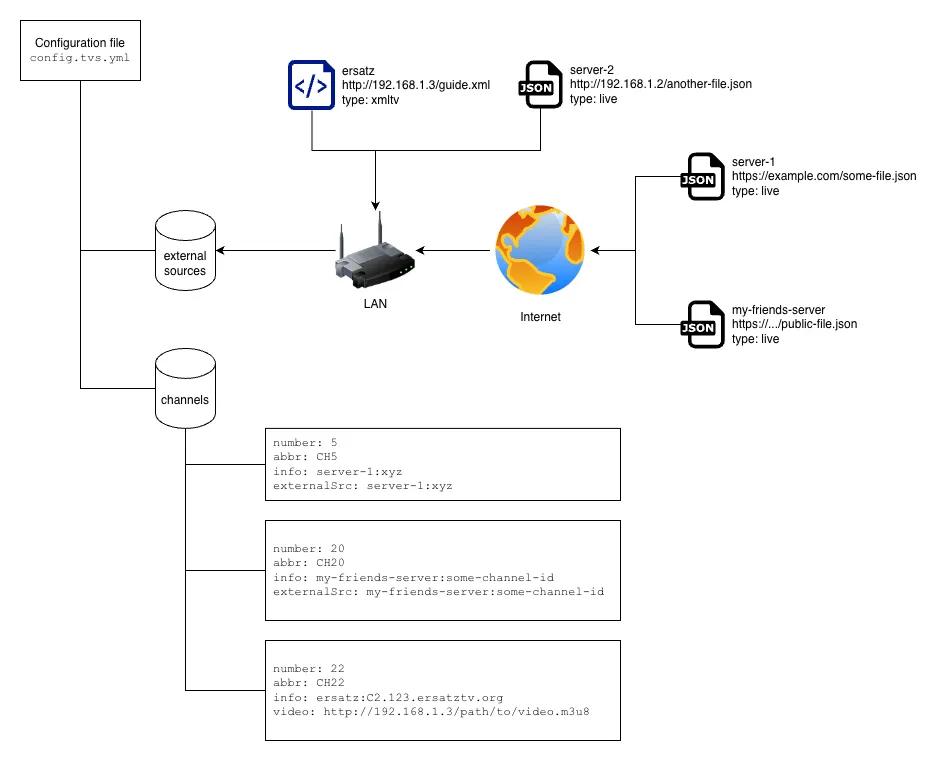
TVS has been designed around the idea of decentralization from the beginning, and external sources are no different. You can define multiple sources to pull guide data or program data from, including sources on your LAN or over the internet.
Take this example JSON file that contains multiple channels with both content and program guide info:
[ { "channelId": "01", "channelAbbr": "HCN", "title": "The Hypercom News Hour", "summary": "Join us for a power hour of news and information from around town and around the world.", "parentalRating": "TV-PG", "isStereo": true, "engine": "image", "props": "https://gcpw.art/tvs/example-files/channel-info/example-channel.png" }, { "channelId": "02", "channelAbbr": "RED", "title": "The Color Red", "engine": "color", "props": "red" }]Here’s a complete example of using that file as an external source as well as getting guide info from it.
externalSources:  channelsWithProgrammingExample:    url: https://gcpw.art/tvs/example-files/channel-info/multiple-channels-with-programming.json    type: live
channels:- number: 100  info: channelsWithProgrammingExample:01  externalSrc: channelsWithProgrammingExample:01
- number: 120  info: channelsWithProgrammingExample:02  externalSrc: channelsWithProgrammingExample:02
The externalSrc engine lets you pull data from an external source and display it on the channel. The info property lets you pull program guide info from an external source. In this example, both are pulling from the same source, but they don’t have to be. It may sound clunky, and in some ways it is, but hear me out… an externalSrc is a content engine just like any other, meaning you can use it inside a layout or a loop like any other engine; it just points to a different source of content that can change whenever it’s shown.
Suppose for instance you’ve got a program guide that has content on the upper half of the screen and the guide takes up the lower half. The program’s info is statically defined as a 24-hour program guide channel, but the content in the upper half could be an externalSrc that points to different content regularly. Now suppose that external source has its own program info defined for it, but we don’t necessarily care about that info since we’re just using the source to display content. That’s the type of flexibility that external sources give you.