Satellite 2007 Theme
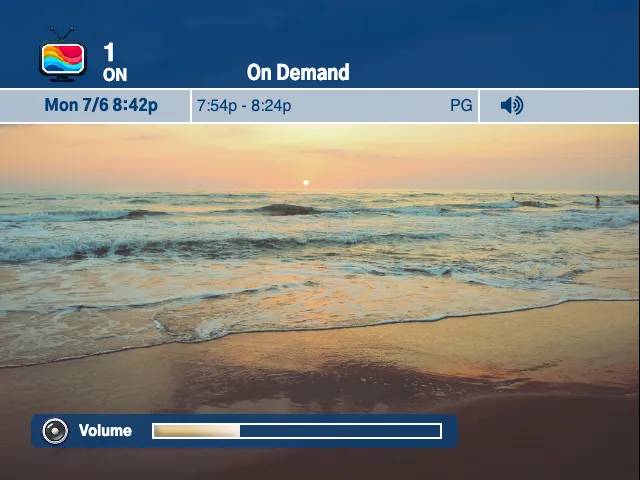
Satellite 2007 is based on mid-2000s satellite receiver graphics. In addition to basic info like channel number and abbreviation, the tuner supports channel icons alongside program information like title, time, rating, and optional (currently decorative-only) status icons. Pressing the info control expands the OSD with program summary and background audio details when available.
osd: theme: sat2007Colors
Section titled “Colors”Satellite 2007 uses primaryColor for the main header background, borders, and volume shell. If you do not set it, TVS uses a deep satellite-guide blue.
accentColor is used for the text in the main header and as the background of the secondary information row. If you do not set it, TVS uses white for the main header text and a pale blue-gray for the secondary row.
osd: theme: sat2007 primaryColor: "#003c74" accentColor: "#b0c0d0"Theme Options
Section titled “Theme Options”showMessageIcon
Section titled “showMessageIcon”Type: boolean
Default: false
Shows a message icon in the tuner OSD status area.
showChannelLockIcon
Section titled “showChannelLockIcon”Type: boolean
Default: false
Shows a channel lock icon in the tuner OSD status area.
unknownChannelIcon
Section titled “unknownChannelIcon”Type: image path or URL
Image to use when the active channel does not define its own icon. If this is not set, TVS uses the built-in unknown channel icon.
Example: Custom Status Icons and Fallback Icon
Section titled “Example: Custom Status Icons and Fallback Icon”osd: theme: sat2007 primaryColor: rebeccapurple accentColor: white themeOptions: showMessageIcon: true showChannelLockIcon: true unknownChannelIcon: /placeholders/no-signal.png
channels:- number: 44 name: Weather Channel abbr: WX icon: /placeholders/weather.pngChannel icons come from each channel’s icon property first. unknownChannelIcon is only used when the channel has no icon.