Daily Schedule
The Daily Schedule engine allows you to schedule content over a repeating 24-hour period. Similar to the loop engine, you define a list of content that you want to repeat, but here you specify a start and end time (in 24-hour time) for each piece of content, as well as an optional block of content that plays when no other content is playing.
- number: 240  name: Daily Schedule  abbr: SCHED  daily-schedule: # The daily schedule engine allows you to define content based on a 24-hour schedule. You can go overnight, but you can't overlap content. The schedule will repeat each day.    noSignalContent: # Optional. You can specify content to show when there's nothing else scheduled.      color: black
    content:    - startTime: "20:00" # Time to start this item, in 24 hour format. Required.      endTime: "05:00" # Time to end this item, in 24 hour format. Required.      image: # The content to show. Required.        src: placeholders/schedule-night.png        pixelated: true
    - startTime: "05:00"      endTime: "11:00"      image:        src: placeholders/schedule-morning.png        pixelated: true
    - startTime: "11:00"      endTime: "20:00"      image:        src: placeholders/schedule-day.png        pixelated: true
Wrapping around midnight
Section titled “Wrapping around midnight”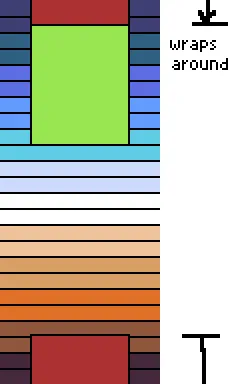
If the end time is before the start time, we assume the content plays through the night into the next day. In the diagram above, the red block of content plays into the next day, followed by the green block.
Properties
Section titled “Properties”content shorthand required
Section titled “content ”Type: content engine[]
Since: TVS 5.8.0
Description: List of content to play. Can be any content that TVS can display. When using the shorthand syntax, the list of content is specified directly under the daily-schedule key without the content property.
startTime sub-property required
Section titled “startTime ”Type: string (in HH:MM 24-hour format)
Description: The time to start showing this content, in 24-hour format.
endTime sub-property required
Section titled “endTime ”Type: string (in HH:MM 24-hour format)
Description: The time to stop showing this content, in 24-hour format.
noSignalContent
Section titled “noSignalContent”Type: content engine
Since: TVS 5.8.0
Description: Content to play when nothing else is on the air. Optional.